Vehicle-Mounted Computers

Zebra Vehicle-Mounted Computing

VC8300
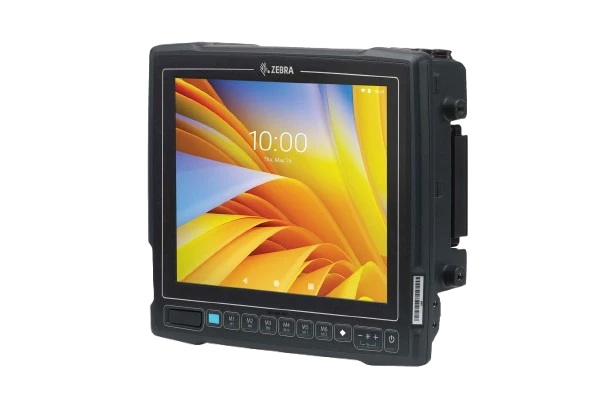
Vehicle Mount Computer

Warehouse apps, right on your vehicle.

Keep inventory and work instructions within reach on forklifts and other warehouse vehicles. Choose your screen and keyboard setup, then the configuration that fits your working conditions.

Zebra VC8300 vehicle mount computer

Find your VC8300 configuration

Two simple questions. No technical background needed.

Which VC8300 setup fits your work?

The main choices are screen and keyboard layout, then standard or freezer use. All four listed configurations have 4 GB memory and 32 GB storage.

VC8300 configurations listed by Arrowhead. The 10-inch model uses a 10.4-inch display panel.
Feature8-inch model10-inch model
Best fitFrequent typing, item codes and keyboard shortcutsMore screen space for touch-based work apps
Display8-inch, 1280 x 720; outdoor-readable display10.4-inch, 1024 x 768; standard display
KeyboardBuilt-in QWERTY keyboardOn-screen keyboard; compatible external keyboard optional
Standard configurationCapacitive touchscreenCapacitive touchscreen
Freezer configurationHeated capacitive touchscreenHeated resistive touchscreen, operated by pressure from a finger or passive stylus
Wireless connectionWi-Fi and BluetoothWi-Fi and Bluetooth
Listed choicesStandard or freezerStandard or freezer

If you need barcode scanning, add a compatible external scanner. Check mounting hardware, vehicle power and cables separately when planning the installation.

Keep work within reach

A rugged Android computer for forklift and warehouse vehicle workflows.

Zebra VC8300 vehicle mount computer

VC8300

Choose the layout that works for your operators.

Use an integrated keyboard for frequent data entry, or choose the larger display for touch-based apps. Standard and freezer configurations are listed for both layouts.

  • 8-inch with built-in QWERTY or larger 10-inch model
  • Wi-Fi and Bluetooth connectivity
  • 4 GB memory and 32 GB storage on all listed SKUs
  • Ivanti Velocity included on the listed configurations

  • North America configurations
View VC8300 Configurations

Plan the vehicle installation

Check the mount, power supply and cables for your vehicle. Add a scanner, external keyboard or antenna if your workflow needs one.