
Zebra ZT610 vs Competitors: A Comparison

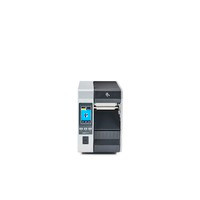
Is the Zebra ZT610's premium price tag justified? We compare durability, print performance, and total cost of ownership against top industrial rivals like the Honeywell PX940, Sato CL4NX Plus, and TSC MH241 to find out.
Zebra ZT610 vs Competitors: A Comparison
Is the Zebra ZT610's premium price tag justified? We break down durability, print performance, and total cost of ownership against top industrial rivals.
Every unreadable barcode comes with a hidden cost — a delayed shipment, a lost pallet, or a production line grinding to a halt. Your standard office printer isn't built for the non-stop demands of a warehouse or factory floor, where a single failed label can create expensive bottlenecks.
This is where a true industrial barcode printer comes in. Heavy-duty machines like the Zebra ZT610 are engineered to prevent these failures, promising near-perfect reliability in tough environments. But its premium price tag raises a critical question: is the ZT610 worth it for your operation?
This comparison of the ZT610 printer and its top competitors focuses on what truly matters: durability, long-term cost, and features that directly impact your bottom line.
While the Zebra ZT610 carries a premium price, it often delivers a lower total cost of ownership through superior durability (all-metal frame, sealed components), high-end print performance (high DPI, up to 14 IPS, thermal transfer), and user-friendly maintenance (quick printhead swaps, side loading). Smart capabilities like Zebra's Link-OS remote management and optional RFID add operational advantages. The best choice depends on your environment, volume and quality needs, and true budget.
Why an Office Printer Will Quietly Sabotage Your Operations
You might be tempted to use a standard office printer for your labels due to its lower price, but this is a false economy. The core issue is duty cycle. A desktop printer is like a passenger car built for occasional trips, while an industrial printer is a commercial truck engineered to run all day, every day. Pushing an office printer past its limits is a recipe for constant breakdowns.
Furthermore, an office printer's plastic frame can vibrate or shift in a busy warehouse, causing misaligned labels and un-scannable barcodes. In contrast, the all-metal construction of the Zebra ZT610 printer provides a rigid, stable platform. This ensures every label prints perfectly, protecting you from the costly ripple effect of a single bad barcode. The real cost of a desktop model shows up in frequent replacements, wasted label stock, and expensive operational downtime.
The 3 Pillars of a Worthy Industrial Printer
A high-performance thermal transfer printer should be evaluated on three core pillars that cut through marketing noise and get to what truly impacts daily operations:
Total Cost of Ownership
What's the real cost over 3–5 years, including media waste, parts, and downtime?
Print Speed & Quality
Can it keep up with demand, and will every barcode always scan reliably?
Durability & Reliability
Will it survive your environment — dust, vibration, temperature swings?
The third pillar, Total Cost of Ownership (TCO), is crucial for your budget. It goes beyond the initial price to include ongoing expenses like wasted media, replacement parts, and downtime. Understanding the TCO of the ZT610 versus its competitors is the secret to making a smart investment.
Durability Showdown: Can the ZT610 Handle a Real-World Warehouse?
The Zebra ZT610 has an all-metal frame, which is the expected standard for this professional class of machine. When comparing the ZT610 to the Honeywell PX940 or other high-performance rivals, this rugged construction is the minimum entry fee. The rigid structure provides a stable foundation that prevents parts from shifting, which is the first step toward consistent, reliable printing.
However, the real durability test happens inside. The ZT610 uses sealed internal components, shielding the delicate moving parts from the biggest enemy on a factory floor: dust and debris. This design maintains the printer's precision alignment over time. When dust can't clog gears or misalign the printhead, you eliminate a primary cause of failed prints and surprise maintenance calls. This robust build directly lowers your long-term costs by reducing troubleshooting time and wasted labels.
Print Performance: Avoiding Unscannable Barcodes and Bottlenecks
Beyond sheer toughness, a printer's real job is producing labels that work flawlessly. Barcode sharpness is measured in DPI (Dots Per Inch). While standard resolution is fine for large shipping labels, the ZT610's high-resolution options are essential for printing tiny, scannable barcodes on small parts or electronics, preventing costly scanning errors.
Next comes the pace of your operation. High-end machines measure their output in inches per second (IPS). A top-tier spec, like the ZT610's 14 IPS, translates to over 70 standard-sized shipping labels per minute. For a busy warehouse, this speed is the difference between a smooth workflow and a shipping station that becomes a bottleneck.
Just as important is the printing method. The Zebra ZT610 uses thermal transfer, which employs a durable ribbon to bond the print to the label. This creates an image that resists smudging, chemicals, and sunlight — critical for asset tags or labels that must survive a long journey. When you conduct a Sato CL4NX Plus vs Zebra ZT610 review, you'll find both deliver on these core performance pillars.
The Hidden Costs: Is the Zebra ZT610's Higher Price Actually Cheaper?
The higher upfront cost can be misleading; the real metric is the Total Cost of Ownership (TCO). For instance, less precise printers often misalign prints, creating unusable, wasted labels. While a few cents per label seems small, it quickly becomes a significant hidden expense. The ZT610 printer's precision engineering minimizes this media waste, turning a potential ongoing cost into long-term savings.
Beyond supplies, think about maintenance. The printhead is a wearable component, like tires on a car. On many models, replacing it requires a paid technician and costly downtime. A key advantage of the Zebra ZT610 is its user-friendly design; your own team can swap the printhead in minutes. This simple feature eliminates service fees and gets your operation running again almost instantly.
Finally, there's the cost of your team's time. A printer with a confusing loading path can steal minutes of labor with every ribbon or label change. The ZT610's simplified, side-loading design turns a frustrating task into a quick swap. These savings from reduced waste, maintenance, and labor often prove that the smarter, more reliable printer is the cheaper one in the long run.
The 'Smart' Features: Remote Management and RFID Explained
Beyond printing, the ZT610's intelligence comes from its software. Zebra's Link-OS remote management features allow your IT team to monitor status, change settings, and troubleshoot printers across your facility from a single computer. This is a huge time-saver, turning a physical chore into a quick, remote click, much like managing your company's PCs centrally.
For businesses managing large inventories, certain ZT610 models offer RFID encoding capabilities. This allows the printer to embed a tiny chip into the label that can be read by radio waves. Imagine scanning an entire pallet of boxes instantly without needing to see or aim at a single barcode. While it's a specialized tool for high-volume operations, it can dramatically accelerate warehouse and logistics workflows.
See the Zebra ZT610 in Action
Get a closer look at the ZT610's build quality, interface, and printing performance.
Your Final Checklist: Choosing Between the ZT610 and Its Rivals
To choose the right industrial thermal printer for your business, use this 3-step checklist with your operations team:
Industrial Printer Selection Checklist
- Calculate Your Real Budget: Did you factor in media waste and staff time? If labor is expensive, user-friendliness is key.
- Define Your Volume & Quality Needs: Are you printing thousands of labels daily or do you require tiny, high-detail barcodes? High volume and quality favor the ZT610.
- Assess Your Environment: How much dust, vibration, and temperature fluctuation will the printer face? More harshness favors the ZT610.
This framework changes the "Zebra ZT610 vs Competitors" comparison from a technical battle to a strategic business choice. If your environment is clean and upfront cost is the absolute priority, a capable competitor like the TSC MH241 often makes more sense. You now have the right questions to look beyond the price tag and select a reliable partner for your operations, not just another machine.
Top Zebra ZT610 Models
In stock and ready to ship from our Chandler, AZ warehouse. All models include Zebra's Link-OS.
Zebra ZT610 — 203 dpi, Tear
ZT61042-T010100Z
- ✓ 203 dpi (8 dots/mm)
- ✓ Up to 14 IPS print speed
- ✓ Serial, USB, Gigabit Ethernet
- ✓ Bluetooth 4.1, USB Host
- ✓ Color touch display
- ✓ Tear-off mode
$2,661.67 MSRP
View Printer →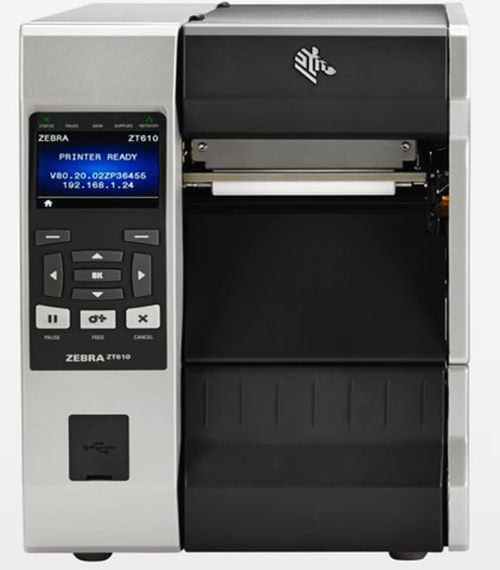
Zebra ZT610 — 300 dpi, Tear
ZT61043-T010100Z
- ✓ 300 dpi (12 dots/mm)
- ✓ Ideal for small barcodes
- ✓ Serial, USB, Gigabit Ethernet
- ✓ Bluetooth 4.0, USB Host
- ✓ Color touch display
- ✓ Tear-off mode
$2,684.16 MSRP
View Printer →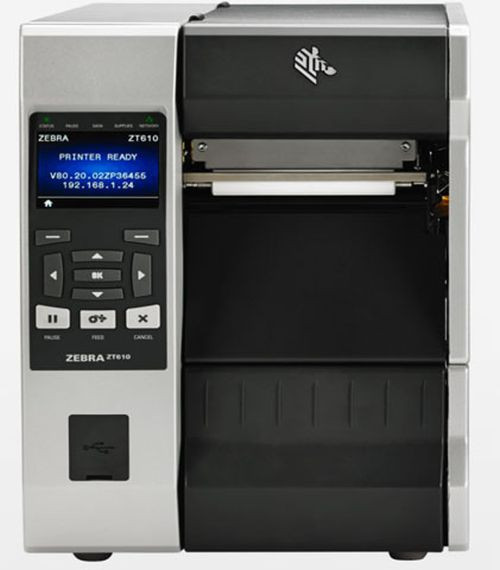
Zebra ZT610 — 203 dpi, Cutter
ZT61042-T110100Z
- ✓ 203 dpi (8 dots/mm)
- ✓ Built-in auto-cutter
- ✓ Serial, USB, Gigabit Ethernet
- ✓ Bluetooth 4.0, USB Host
- ✓ Color touch display
- ✓ Cut-after-print mode
$3,269.33 MSRP
View Printer →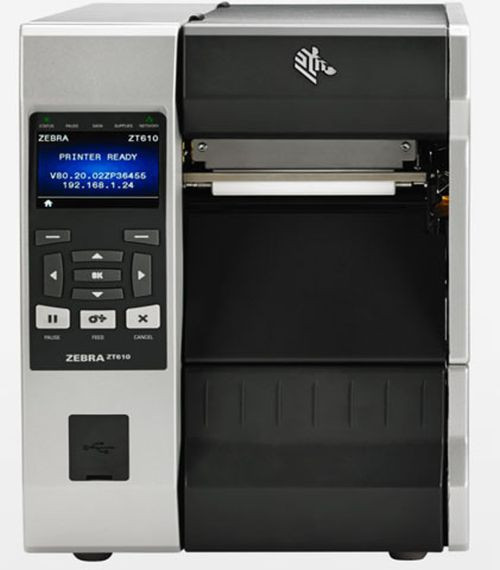
Zebra ZT610 — 203 dpi, RFID UHF
ZT61042-T0101A0Z
- ✓ 203 dpi (8 dots/mm)
- ✓ UHF RFID encoder built-in
- ✓ Serial, USB, Gigabit Ethernet
- ✓ Bluetooth 4.0, USB Host
- ✓ Color touch display
- ✓ Print & encode in one pass
$4,281.74 MSRP
View Printer →Frequently Asked Questions
Is the Zebra ZT610 worth its premium price compared to competitors?
Often, yes — if your operation values uptime, precision, and long-term savings. The ZT610 typically lowers total cost of ownership through rugged design (all-metal frame, sealed components), high-end print performance (high-resolution options, up to 14 IPS, thermal transfer), and user-friendly maintenance (quick printhead swaps, side loading). Smart features like Link-OS remote management and optional RFID further reduce labor and errors. That said, in cleaner environments with lighter demands and tight upfront budgets, a capable rival like the TSC MH241 can be the more economical pick.
What specific durability advantages does the ZT610 offer in real-world warehouses?
Beyond its all-metal frame — now table stakes in this class — the ZT610's sealed internal components protect moving parts from dust and debris. This keeps precision alignment stable over time, preventing the gradual drift that causes misprints and downtime. Compared with peers like the Honeywell PX940, this attention to internal protection directly reduces failed labels, surprise service calls, and long-run costs.
How do the ZT610's print speed and quality translate into operational benefits?
High-resolution options ensure tiny barcodes on small parts remain reliably scannable, avoiding costly rework and delays. With speeds up to 14 inches per second, you can produce over 70 standard shipping labels per minute, preventing bottlenecks at busy stations. Thermal transfer printing creates durable images that resist smudging, chemicals, and sunlight — critical for asset tags and long-haul labels.
What hidden costs does the ZT610 help avoid over 3–5 years?
It minimizes wasted media by maintaining precise alignment, so fewer labels end up in the trash. Its user-replaceable printhead and simplified side-loading cut technician fees and reduce changeover time. The result is less downtime and lower labor costs — key drivers of total cost of ownership that often outweigh a higher purchase price.
What do Zebra's Link-OS and optional RFID add, and who benefits most?
Link-OS enables centralized, remote monitoring and configuration, turning on-site troubleshooting into a quick, desk-based task — ideal for facilities with many printers or limited IT bandwidth. Optional RFID encoding allows rapid, line-of-sight-free item or pallet reads, dramatically accelerating inventory and logistics processes in high-volume operations.
Need Help Choosing the Right Industrial Printer?
Our Zebra-certified specialists can help you compare the ZT610 to alternatives for your specific environment.