
SE4770
- Omnidirectional 1D and 2D imager
- Standard-range barcode scanning
- A numeric decode range is not provided in the sheet
An enterprise touch computer with a 4-inch display, a choice of barcode scan engines, a 7,000 mAh battery with hot-swap backup, and IP65 sealing for warehouse and industrial workflows.
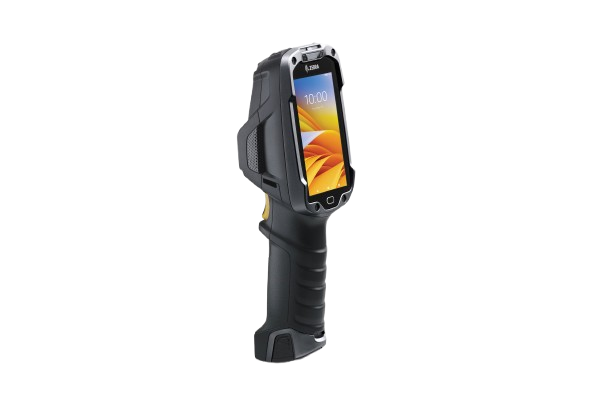
Scanning capability depends on the engine in the selected configuration. These options are listed in the TC8300 specification table.
The SE4850 figures are Zebra’s stated range, not a guarantee that every barcode can be read at every distance. The sheet does not include a barcode-specific decode chart. Confirm barcode size, material and working distance for your application.
| Category | Specification |
|---|---|
| Standard-range scanner | SE4770: omnidirectional 1D/2D imager. Numeric decode range is not provided. |
| Medium-range scanner | SE4750 (called SE4750 MR in the feature text): omnidirectional 1D/2D imager. Numeric decode range is not provided. |
| Direct Part Mark scanner | SE4750 DPM: Direct Part Mark imager. Choose the DPM configuration for direct part mark requirements. |
| Extended-range scanner | SE4850: 1D/2D extended-range imager. Zebra lists 3 in. / 7.62 cm to 70 ft. / 21.4 m, and 4 in. / 10.16 cm-wide barcodes from 7 in. / 17.78 cm away. The sheet does not supply a barcode-by-barcode decode chart. |
| Hands-free proximity scanning | Automatic scan triggering when worn on the hip or shoulder strap, or placed on a cart or desktop. Two modes: near contact to 6 in. / 15 cm, and contact to 1.96 ft. / 60 cm. These are proximity-mode distances, not decode ranges for every scan engine. |
| Camera (optional) | 13 MP rear-facing autofocus camera; f/2.4 aperture. Photo and video capture. |
| NFC (optional) | Tap to Pair; ISO 14443 Type A and B, FeliCa and ISO 15693 cards; peer-to-peer (P2P) mode; Host Card Emulation (HCE). |
| Multi-barcode / form capture | The sheet describes SimulScan for labels containing multiple barcodes and text fields. Mobility DNA features vary by model and may require a support contract. |
The camera and NFC are optional. Hands-free proximity-mode distances are separate from the scan engine’s barcode decode range.
The TC8300 places the screen in view while scanning to reduce repeated tilting, with touch input and an integrated scan handle.
800 × 480 transflective LCD with 400-nit brightness, Corning Gorilla Glass, and bare or gloved fingertip input. A conductive stylus is supported and sold separately.
Qualcomm Snapdragon 660 at 2.2 GHz, with 4 GB RAM and 32 GB Flash pSLC. The sheet lists an upgrade path to Android 14.
7,000 mAh lithium-ion battery with hot-swap backup. Zebra describes three consecutive shifts without a battery change, based on a typical user profile.
IP65 sealing, multiple 8 ft. / 2.4 m drops at room temperature, multiple 6 ft. / 1.8 m drops across the operating range, and 2,000 tumbles from 3.3 ft. / 1 m.
“Upgradeable to Android 14” does not establish the version installed on a shipped unit. The battery claim does not specify fixed runtime hours or charging time.
Dimensions, display, memory, power, controls and sensors in one reference.
| Category | Specification |
|---|---|
| Processor | Qualcomm Snapdragon 660 octa-core, 2.2 GHz. |
| Operating system | Upgradeable to Android 14. The sheet does not specify the Android version installed on a shipped unit. |
| Memory | 4 GB RAM / 32 GB Flash pSLC on Base, Condensation Resistant, DPM and Package 1 models. |
| Expandable storage | SDXC-compliant microSD card slot. Maximum card capacity is not stated. |
| Application development | Enterprise Mobility Development Kit (EMDK) available through Zebra Support Central. |
| Dimensions (L × W × D) | 9.17 × 2.99 × 2.52 in. / 233 × 76 × 64 mm. |
| Weight | Base: 17.2 oz. / 490 g. Package 1: 17.6 oz. / 500 g. |
| Display | 4.0 in. diagonal, 800 × 480 pixels; transflective LCD; 16.7 million colors (24-bit); 400 nits. |
| Touch panel | Multi-touch projected capacitive; bare or gloved fingertip input; conductive stylus supported (sold separately). Corning Gorilla Glass. |
| Keypad | On-screen keypad. |
| Notifications | Audible tone, multicolor LEDs and vibration. |
| Voice & audio | Dual speakers; Bluetooth wireless headset support. |
| Battery | PowerPrecision+ lithium-ion, 7,000 mAh. |
| Battery replacement | Hot-swap battery backup. The spec sheet does not give a maximum swap duration. |
| Runtime claim | Zebra describes three consecutive shifts without a battery change, based on a typical user profile. It does not provide a fixed runtime in hours. |
| Battery management | Battery metrics help identify aging batteries. PowerPrecision Console is described as a no-cost, PC-based monitoring tool. |
| Charging & supplied accessories | Charge time, charger inclusion and box contents are not specified in this sheet. |
| Light sensor | Automatically adjusts display backlight. |
| Motion sensors | 3-axis accelerometer and 3-axis gyroscope. |
| Proximity & magnetic sensors | Proximity sensor for automatic hands-free scanning; magnetic sensor detects insertion in a cart mount or holster. |
The sheet names Base, Condensation Resistant, DPM and Package 1 models. It does not list package contents or map every feature to an individual part number.
IEEE 802.11a/b/g/n/ac/d/h/i/r/k/w with 2×2 MU-MIMO, plus Class 2 Bluetooth 5.0 and Bluetooth Low Energy.
The camera, NFC, condensation resistance and TAA compliance are configuration-dependent options. Verify these requirements against the selected part number.
Listed wireless data rates are not guaranteed application throughput. Actual channels and frequencies depend on regulatory rules and certification.
| Category | Specification |
|---|---|
| Wi-Fi radio | IEEE 802.11a/b/g/n/ac/d/h/i/r/k/w; 2×2 MU-MIMO. |
| Wi-Fi data rates | 5 GHz (802.11a/n/ac): up to 866.7 Mbps. 2.4 GHz (802.11b/g/n): up to 300 Mbps. Listed radio data rates are not guaranteed application throughput. |
| Wi-Fi channels | Channels 36 to 165 (5180 to 5825 MHz); channels 1 to 13 (2412 to 2472 MHz). Actual channels and frequencies depend on regulatory rules and certification. |
| Security & encryption | As listed in the sheet: WEP; WPA-TKIP; WPA2-TKIP; WPA2-TKIP AES; EAP TTLS; PAP; MSCHAP; MSCHAP v2; PEAPv0-MSCHAPv2; PEAPv1-EAP-GTC; EAP-TLS; EAP-FAST; LEAP. FIPS 140-2 Level 1 support for data in motion and data at rest. |
| Multimedia | Wi-Fi Multimedia (WMM). |
| Wi-Fi certifications listed | WFA: 802.11n, WMM-PS, 802.11ac, PMF, WMM-AC, Voice Enterprise, Wi-Fi Direct and WPS 2.0. |
| Fast roaming | PMKID caching, Cisco CCKM, OKC and 802.11r. 802.11r and 802.11k for enterprise voice roaming are included. |
| Bluetooth | Class 2, Bluetooth 5.0 and Bluetooth Low Energy (BLE). |
| Docking connection | USB 2.0 OTG host docking interface. |
| Cellular / GPS | Cellular radios, SIM support and GPS specifications are not listed in the supplied sheet. |
Operating limits, impact ratings and protection details from the supplied spec sheet.
| Requirement | Specification |
|---|---|
| Operating temperature | -4°F to 122°F / -20°C to 50°C. |
| Storage temperature | -40°F to 158°F / -40°C to 70°C. |
| Humidity | 5% to 95%, non-condensing. Condensation resistance is optional. |
| Drop specification | Multiple 8 ft. / 2.4 m drops to concrete at room temperature per MIL-STD 810G; multiple 6 ft. / 1.8 m drops to concrete across the full operating temperature range. |
| Tumble specification | 2,000 tumbles from 3.3 ft. / 1 m. |
| Sealing | IP65. Zebra describes the device as dustproof and able to handle jetting water; the sheet does not give an immersion rating. |
| Vibration | 4 g peak sine (5 Hz to 2 kHz); 0.04 g²/Hz random (20 Hz to 2 kHz). |
| Thermal shock | Rapid transition: -40°F to 158°F / -40°C to 70°C. This is distinct from the operating-temperature range. |
| Scanner window | Corning Gorilla Glass. |
| Electrostatic discharge (ESD) | ±20 kV DC air; ±10 kV DC direct; ±10 kV DC indirect discharge. |
The storage and thermal-shock ranges are different from the continuous operating range. IP65 is the stated sealing rating; the sheet does not claim protection for immersion.
Mobility DNA tools described in the sheet help with application migration, setup, connectivity, battery monitoring and updates.
The sheet describes using existing terminal emulation applications and converting traditional green screens to touch-oriented screens without coding.
Described as complimentary and preloaded. Restricted Mode lets administrators deactivate and reactivate Google Mobile Services.
Described as a complimentary tool for Wi-Fi connectivity, roaming, voice quality and network diagnostics.
A no-cost, PC-based dashboard described for identifying aging batteries across a battery pool.
Security updates and OS update management. The sheet describes LifeGuard Analytics as included with a Zebra OneCare support contract.
The sheet describes capturing labels with multiple barcodes and text fields, as well as entire forms.
Mobility DNA is available on Android only. Features vary by model and a support contract may be required. The sheet does not establish current availability, license entitlements or support end dates for a specific unit.
| Category | Specification |
|---|---|
| TAA | TAA-compliant options on select configurations. Do not assume every TC8300 configuration is TAA compliant. |
| FIPS | FIPS 140-2 Level 1 support for data in motion and data at rest, as stated in the sheet. |
| Environmental compliance | RoHS Directive 2011/65/EU with Amendment 2015/863; REACH SVHC 1907/2006. |
| Hardware warranty | One year from date of shipment for defects in workmanship and materials, subject to Zebra’s hardware warranty terms. |
| Recommended support services | Zebra OneCare Essential and Select. Asset Visibility Services (AVS) and Operational Visibility Service (OVS) are options on Zebra OneCare support contracts. |
| Software conditions | Mobility DNA is available on Android only. Features vary by model and a support contract may be required. |
Use cases listed in Zebra’s TC8300 specification sheet.
The supplied spec sheet states “Upgradeable to Android 14.” It does not state the version preinstalled on every unit, the upgrade procedure, eligibility conditions or a support end date. Confirm the installed version and upgrade requirements for the specific configuration.
The SE4770 is listed for standard-range 1D/2D scanning, the SE4750 MR for medium-range 1D/2D scanning, the SE4850 for extended-range 1D/2D scanning, and the SE4750 DPM for direct part marks. The sheet does not provide numeric ranges for the standard- or medium-range engines, or a complete barcode decode chart. Check your barcode size, material and working distance when selecting an engine.
No. The distance of up to 70 ft. / 21.4 m is stated for the SE4850 extended-range imager. It is not a specification for every TC8300 or every barcode. Zebra also lists a close distance of 3 in. / 7.62 cm for that engine, without a barcode-specific decode chart in this sheet.
Both are optional. The camera is a rear-facing 13 MP autofocus unit with an f/2.4 aperture. Optional NFC supports Tap to Pair, ISO 14443 Type A and B, FeliCa, ISO 15693, peer-to-peer mode and Host Card Emulation. Verify both options on the part number you select.
The TC8300 uses a 7,000 mAh PowerPrecision+ lithium-ion battery with hot-swap backup. Zebra describes three consecutive shifts without a battery change, based on a typical user profile. The sheet gives no fixed runtime in hours, charge time or maximum hot-swap interval.
The operating range is -4°F to 122°F / -20°C to 50°C. Standard humidity is 5% to 95%, non-condensing, with a condensation-resistant option available. Choose the appropriate configuration for the environment; the lower storage and thermal-shock limits are not continuous operating limits.
The stated sealing is IP65. Zebra describes resistance to dust and jetting water. The sheet does not claim protection for immersion, so it should not be treated as an immersion-rated device.
Yes. The projected-capacitive multi-touch screen supports bare or gloved fingers and a conductive stylus. The stylus is sold separately. The device uses an on-screen keypad.
The sheet specifies dual-band 802.11a/b/g/n/ac Wi-Fi with 2×2 MU-MIMO, Bluetooth 5.0 with BLE, and a USB 2.0 OTG host docking interface. It does not list cellular, SIM or GPS specifications.
An SDXC-compliant microSD card slot is listed. The sheet does not specify maximum card capacity or whether a card is included.
The sheet describes support for existing terminal emulation applications and All-touch Terminal Emulation to convert traditional green screens to touch-oriented screens without coding. Confirm the requirements of your application and deployment. Mobility DNA features vary by model and a support contract may be required.
This spec sheet does not list package contents, charger inclusion, accessory part numbers or the contents of Package 1. A conductive stylus is explicitly sold separately. Verify the device, battery, charging equipment and any mounting or carrying accessories against the selected product listing.
Zebra lists a one-year hardware warranty from shipment for defects in workmanship and materials, subject to its warranty terms. OneCare Essential and Select are recommended support services. AVS and OVS are options on OneCare contracts. These services are separate from the basic warranty description.
No. The sheet describes TAA compliance as optional on select configurations. Confirm this requirement against the selected part number.
Source: Zebra, TC8300 Touch Computer Product Spec Sheet (tc8300-spec-sheet-en-gb.pdf), pages 1-4. Optional features depend on configuration. Details not provided in the sheet are identified above.
Contact us for help choosing the scan engine and required options. Confirm the installed Android version, box contents, charging equipment and any software or support coverage for your selected part number.